

When to Use the Meta AI Business Assistant:
- Rapid Account Troubleshooting: Turn to the assistant immediately for disabled accounts, pixel errors, or updates to your spend limit.
- First-Layer Data Retrieval: Use the assistant’s function to pull 28-day performance metrics, identify top-performing creatives, and check industry benchmarks.
- Streamlined CAPI Setup: Utilize the one-click Conversions API integration to improve data tracking quality and feed Meta’s machine learning models for better performance.
Jump to Section

Meta AI Business Assistant: Features, Use Cases, and Best Practices
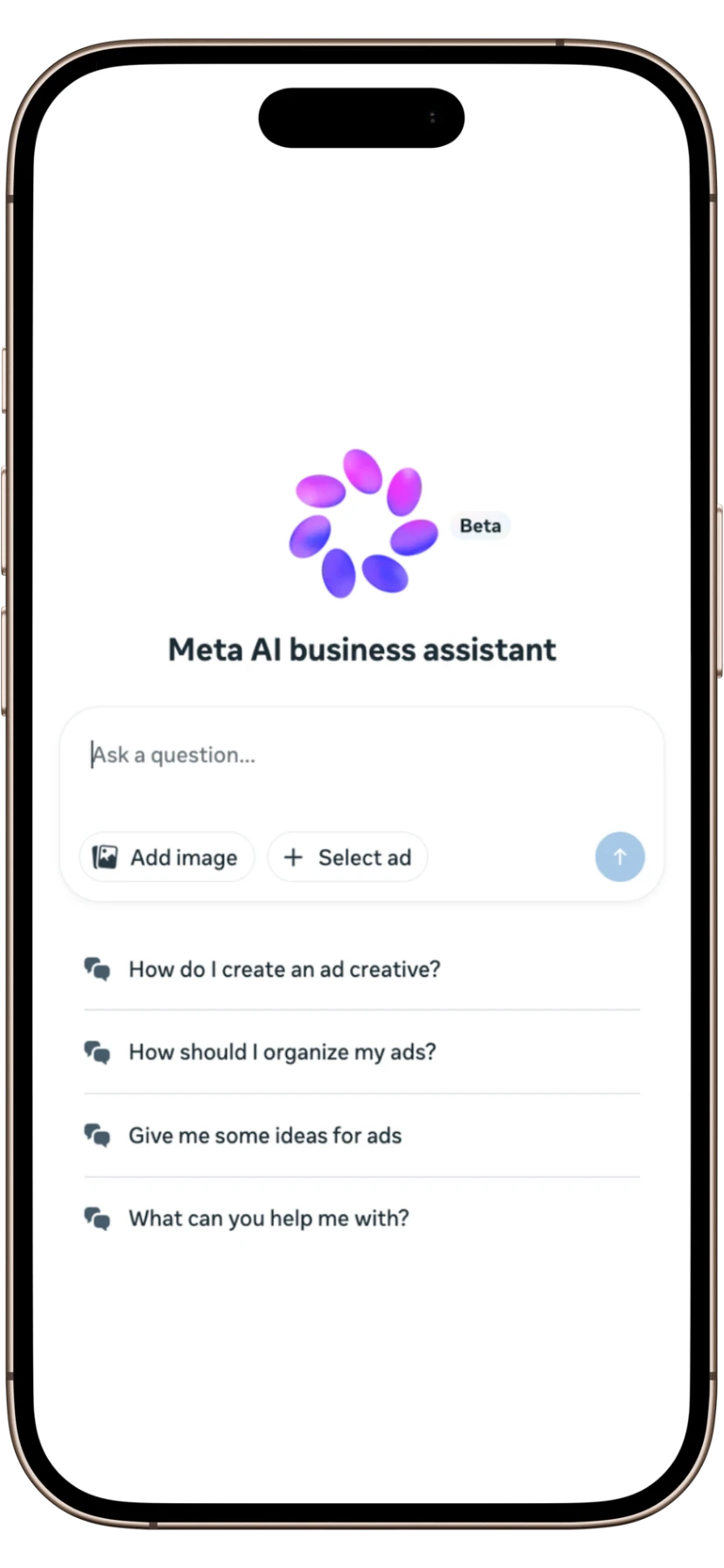
Integrated directly into Business Suite and Ads Manager, the Meta AI Business Assistant serves as a conversational resource for performance analysis, account troubleshooting, and optimization advice.
Following its global rollout, advertisers now have a 24/7 analyst that can generate data-driven recommendations. Initial beta results show a significant impact: users resolved account issues 20% more frequently, and those implementing opportunity-score suggestions experienced a 12% reduction in CPA.
To maximize returns while maintaining control, teams must understand the features, operational use cases, and best practices necessary to transform this AI integration from a basic chatbot into a strategic advantage.
What is the Meta AI Business Assistant?
In essence, it is an always-on, conversational diagnostic layer built directly into the interfaces media buyers use every day. By analyzing data from your Facebook and Instagram ads, this tool helps marketers reach a first diagnosis faster without leaving the Ads Manager.
Powered by Meta’s AI models, the assistant is now globally available, with local-language support across the US, EMEA, APAC, and LATAM markets. It simplifies the user experience by replacing complex menu navigation with the ability to query campaign performance using natural language.
By providing tailored recommendations and instant performance insights, Meta Platforms Inc. aims to drastically reduce the time you spend pulling manual reports so you can focus on high-level Meta advertising strategy.
3 Core Use Cases of Meta AI Business Assistant for Advertisers
Let’s look at how it solves specific, daily friction points for media buyers and marketing directors.
1. Instant Troubleshooting
Historically, dealing with a disabled Meta ads account or a payment error meant submitting a ticket and waiting days in slow support queues.
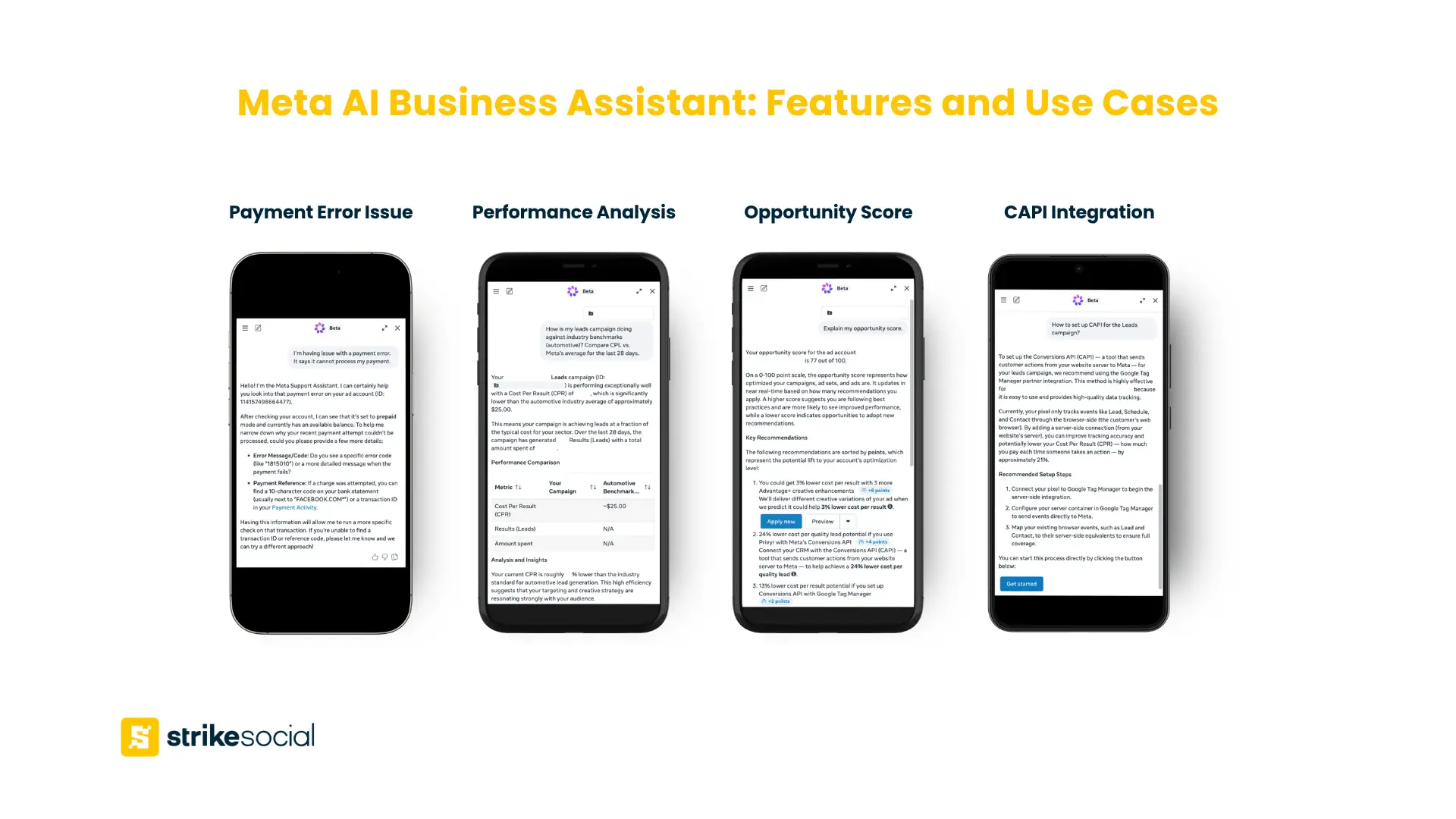
The Meta AI Business Assistant fundamentally changes this process. Advertisers can now bypass standard support queues to instantly troubleshoot payment or delivery errors. The assistant provides step-by-step guidance to help advertisers restore disabled accounts and update spend limits in seconds.
2. Real-Time Performance Analysis
Instead of manually exporting spreadsheets to find performance anomalies, you can now ask direct questions to retrieve complex data instantly.
When prompted to evaluate performance, the assistant instantly pulls 28-day performance metrics, highlights creative engagement data, and identifies top and bottom performers. Furthermore, it provides industry benchmarking, allowing advertisers to compare their click-through rate (CTR) and CPA with those of similar businesses.
The primary strength of the Meta AI Business Assistant is speed: it helps advertisers get to the first layer of data faster, particularly when managing dozens of campaigns simultaneously.
3. Opportunity Scores & One-Click CAPI Integration
The most direct impact on return on ad spend (ROAS) comes from the platform’s optimization capabilities. The assistant introduces an “opportunity score,” which provides campaigns with a numerical score and generates tailored, actionable recommendations based on your business data.
This system utilizes a 0-100 scale to provide a comprehensive evaluation of campaign performance and optimization health. Essentially, it serves as Meta’s internal audit of your campaign, identifying areas for growth and offering critical pointers to reduce CPA via Advantage+ suite tools or other integrated solutions.
Additionally, Meta is introducing a streamlined, one-click setup for the Conversions API (CAPI). By linking website events straight to the advertising ecosystem, CAPI significantly improves data quality. Better event data feeds the machine learning models, which in turn leads to superior Advantage+ ad optimization and a lower cost per acquisition.
Is your AI Assistant giving you the right advice?
Partner with experts to activate, manage, and scale your Meta campaigns using our advanced proprietary ad technology for peak efficiency.
Meta AI Business Assistant vs. Human Media Buyers
Can Meta AI improve ad performance? Yes, but only if the human guiding it knows how to judge the signals. The Meta AI Business Assistant can be a helpful diagnostic tool, but it does not replace the strategic oversight of an experienced media team.
It’s critical to understand where the automation ends and human expertise begins. AI tools are excellent at surfacing the symptoms of a campaign, but they cannot reliably prioritize the response in the context of broader business goals.
| Function | Meta AI Business Assistant (Diagnosis) | Human Media Buyer (Strategy) |
|---|---|---|
| Data Retrieval | Instantly surfaces spend changes, CTR drops, or CPA increases across multiple campaigns. | Determines if the metric shift is a true problem or an expected fluctuation based on seasonality. |
| Optimization Advice | Recommends budget shifts, pausing underperforming audiences, or rotating creative. | Judges whether the recommended change supports the wider business goal, product margins, and inventory realities. |
| Creative Analysis | Identifies which ad creatives are generating the most engagement over a 28-day period. | Understands why certain creative angles perform better and develops net-new concepts to test. |
| Account Issues | Provides the exact workflow for restoring a disabled account or fixing a pixel error. | Establishes an account governance and tracking architecture to prevent the error from recurring. |
While the AI can promptly notify you of rising campaign CPAs, the responsibility remains with the media buyer to diagnose the root cause: whether it stems from creative fatigue, weak audience quality, increased auction competition, or external variables. Thus, maintaining a human expert in the loop to vet recommendations before they are implemented in Ads Manager is essential rather than relying solely on the AI assistant.
Further Reading
When Advantage+ Placements Make Sense for Your Campaigns
Advantage+ placements distribute ads across the Meta ecosystem, optimizing delivery based on performance signals. For advertisers without clear placement data, this automation helps uncover high-performing environments. However, campaigns with specific targeting or creative requirements may benefit from a more controlled, manual setup.
How to Use the Meta AI Business Assistant
To integrate this tool into your daily operations, follow these steps to access and command the assistant effectively.
- Log in to your Meta Ads Manager account at business.facebook.com.
- Find the assistant in the left-side navigation, placed just above the Help icon.
- Click the Meta AI business assistant to open the chat interface. You can click the pre-populated suggestions or type a custom query.
- To get the most accurate answers, avoid vague questions. Use our recommended framework: Action + Metric + Scope + Time Frame.
High-Impact Prompt Examples:
- “Analyze CPA trends for my retargeting campaigns over the last 30 days.”
- “What changed in my top-performing ad sets over the last 14 days?”
- “Which audience segments are showing weaker conversion efficiency?”
- “Compare my CTR to similar [industry] brands.”
Similar to your ChatGPT prompting approach, formulating precise questions is key to obtaining actionable, effective insights from the Meta AI Business Assistant.
FAQs on Using the Meta AI Business Assistant
You can access the assistant directly within the left-hand navigation menu of Meta Ads Manager. There are no additional plugins or tabs to install.
Yes, the AI Business Assistant is included natively in your existing Meta Ads Manager account at no additional cost.
It is currently being launched globally across the APAC, EMEA, LATAM, and US markets. The assistant provides comprehensive support for multiple languages, including Mandarin, Portuguese, German, French, Spanish, and English.
You can interact with the tool using plain language in a conversational chat interface. Simply type your questions directly into the chat box inside Ads Manager.
To get the best results, use precise prompts with a clear scope and period, such as “Which campaign is driving the strongest results this week?” or “Which ad sets saw a CPA increase yesterday?”.
No, the Meta AI Business Assistant analyzes performance and suggests optimizations. While Meta offers separate generative AI features for creative generation within the ad creation interface (like the Advantage+ suite), the assistant itself does not generate images or write final ad copy.
The assistant acts as an advisory layer, providing opportunity score recommendations and performance analysis. It recommends actions, but the media buyer ultimately approves and implements them.
Better Decisions Drive Better Outcomes
As Meta advertising tools continue to evolve, faster diagnostics will become the standard baseline for all advertisers. The Meta AI Business Assistant serves as a powerful resource, effectively reducing the tedious manual labor of generating basic reports and the delays associated with support tickets.
However, the true competitive edge in modern Meta advertising will not come from simply seeing the signal first; it will come from correctly interpreting the signals. With AI making data immediately available, the role of paid media professionals is evolving from technical execution to high-level strategy. By effectively utilizing the Meta AI Business Assistant, media buyers can elevate their strategic thinking and execution, ultimately driving superior long-term campaign results.

Article by
Lee Baler, Strike Social’s VP of Sales & Strategy
Lee leads global strategy, helping clients and agencies maximize YouTube and paid social performance. Constantly tracking industry trends, he translates insights into strategies that help brands stay competitive and achieve sustained profitability.


