

2026 Performance Max Updates at a Glance
- Placement & Spend Transparency: View network-segmented data in the “Where ads showed” report and track spend over time per channel.
- Advanced Audience Steering: Exclude existing first-party customer lists and secure conversions with the “High value new customer mode”.
- Granular Targeting Controls: Apply campaign-level negative keywords, brand exclusions, and account-level placement exclusions.
- Upgraded Asset Capabilities: Video limits increased from 5 to 15 per Asset Group, allowing for a more competitive advantage on YouTube ads.
- Creative A/B Testing: Apply A/B testing on asset sets by splitting traffic between control and treatment groups.
Performance Max Updates: What’s New in Google PMax Campaigns
As we move beyond the platform’s historical “black box” reputation, it’s essential to stay up to date on Performance Max updates this year. For years, Performance Max campaigns have left many advertisers frustrated by the lack of granular data. However, the latest updates now provide a glimmer of hope. These new updates to PMax require understanding that, in 2026, these features and reporting controls will finally hand the steering wheel back to the advertiser.
These updates are designed to improve day-to-day management and operational visibility. Let’s explore what new features were added to Performance Max and how they impact your overarching strategy.
What Are the Latest Google Performance Max Updates?
If you are wondering how PMax has changed recently, the answer revolves around three core themes. Google is actively filling the operational gaps that previously made Performance Max campaigns difficult to manage and modify.
The primary Performance Max updates fall into these buckets:
Visibility and Reporting
Introductions of budget projections, network-level placement visibility, and expanded audience insights.
Targeting Controls
The rollout of first-party audience exclusions, campaign-level negative keywords, and precise demographic and device betas.
Creative Assets
The highly anticipated introduction of A/B asset testing, expanded video limits, and AI-driven asset generation.
Breaking Down the Google PMax Reporting Updates 2026
We asked, and Google delivered. Media buyers have consistently demanded to know where their PMax ads are serving. The 2026 updates deliver exactly that, transforming previously plain dashboards into actionable data points.
Placement Visibility: Where Do Performance Max Ads Show?
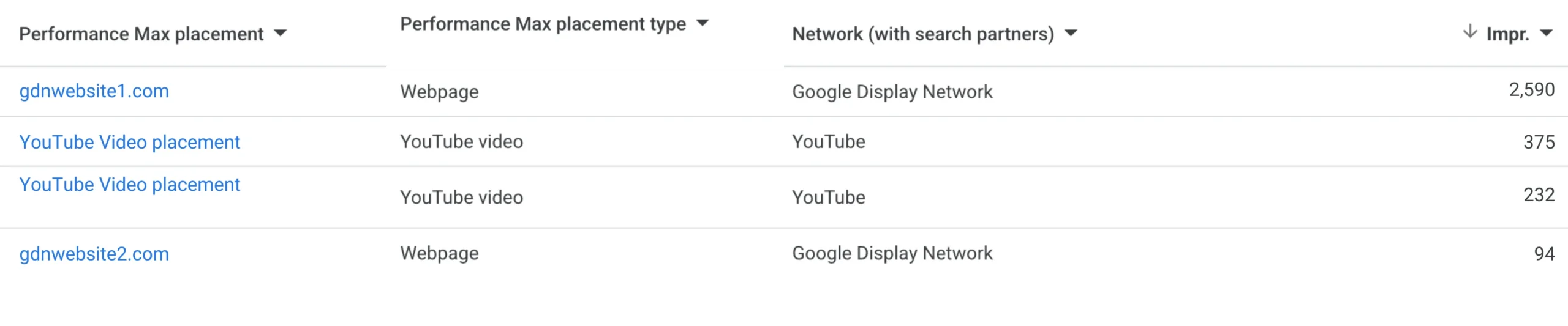
Historically, tracking exact placements within PMax felt like guesswork. Now you can access a report to see where your ads showed, providing granular, network-segmented data.
- Advertisers can track impressions by placement type and network.
- This includes much-needed clarity on placements within Google Search Partners, which was previously a gray area.
- This allows advertisers to monitor placement quality and ensure strict brand suitability across all channels.
Channel Performance and Spend Over Time
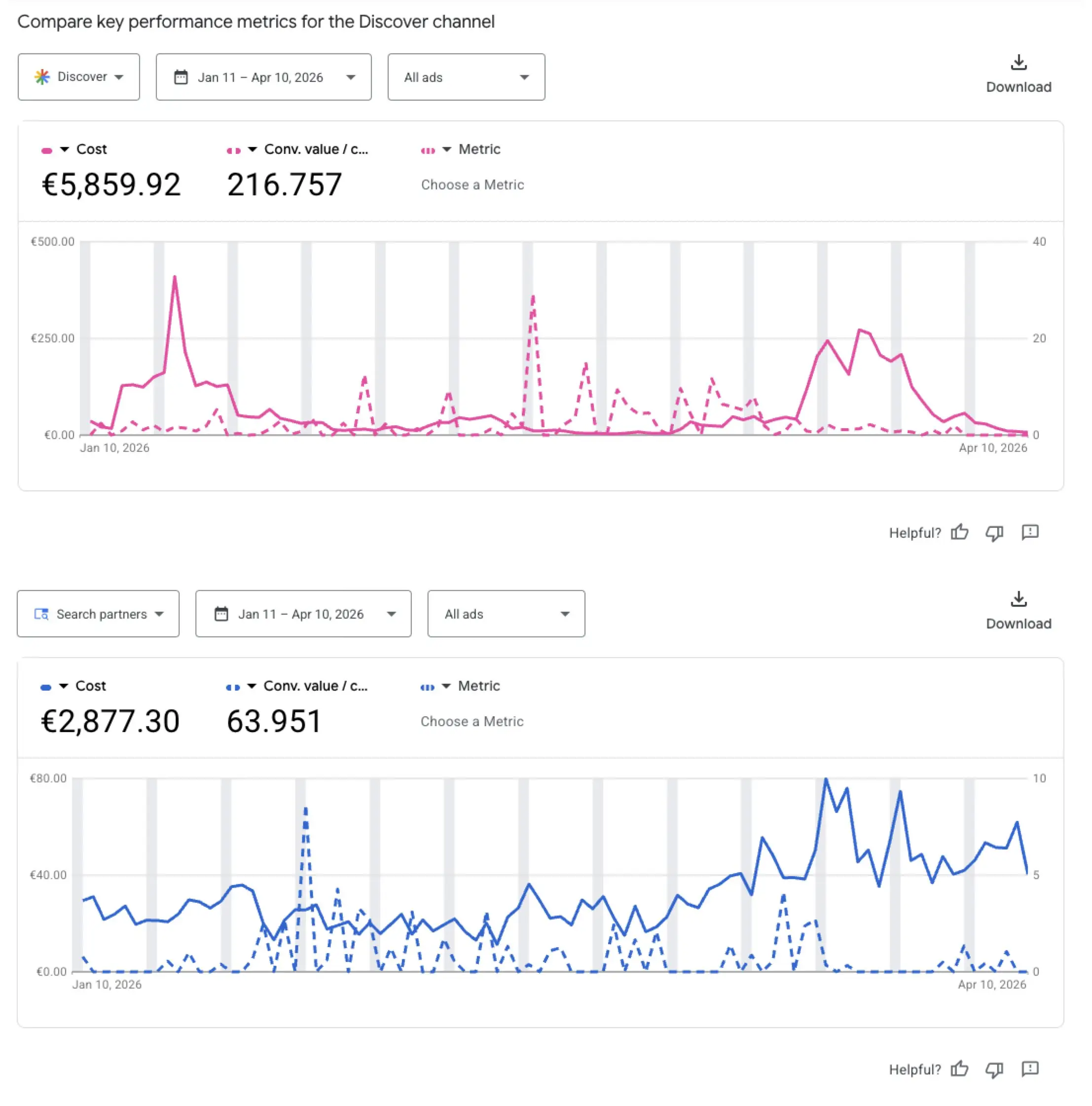
A significant new PMax feature is the channel performance report, found on the insights page. This tool provides unparalleled ease in determining if a channel’s volume is consistent, both in relation to its spend and over time. Furthermore, it helps quickly identify any sudden spikes a channel might be experiencing during a specific campaign period.
More Precise Targeting Controls for PMax’s AI Engine
The latest round of Performance Max updates introduces a new suite of targeting controls, giving advertisers the controls they need to dictate exactly who the algorithm pursues, and more importantly, who it ignores.
First-Party Audience Exclusions and High-Value New Customer Mode
Advertisers can now apply first-party audience exclusions to Performance Max campaigns. These typically include customers who have already converted or are highly likely to convert soon. By excluding these users, advertisers can better steer their campaign targeting to reach:
- Users who are new to the brand (top-funnel awareness)
- Users who are familiar with competitor brands
This ensures your PMax ad spend is optimized to reach prospects who need more exposure to the brand.
Additionally, the high-value new customer mode has rolled out to all advertisers. Google’s AI utilizes data from first-party customer lists, designated as high-value through Customer Match, to inform bidding strategy. The AI will prioritize bidding higher for audience profiles that align with these high-value customer lists, with the goal of maximizing their lifetime value.
Google’s AI will use the data collected from the first-party customer lists that you have specified as high value through Customer Match, and use this to bid higher for these types of audience profiles and maximize lifetime value for them.
Further Reading
Build and Activate GA4 Audiences for Google Ad Campaigns
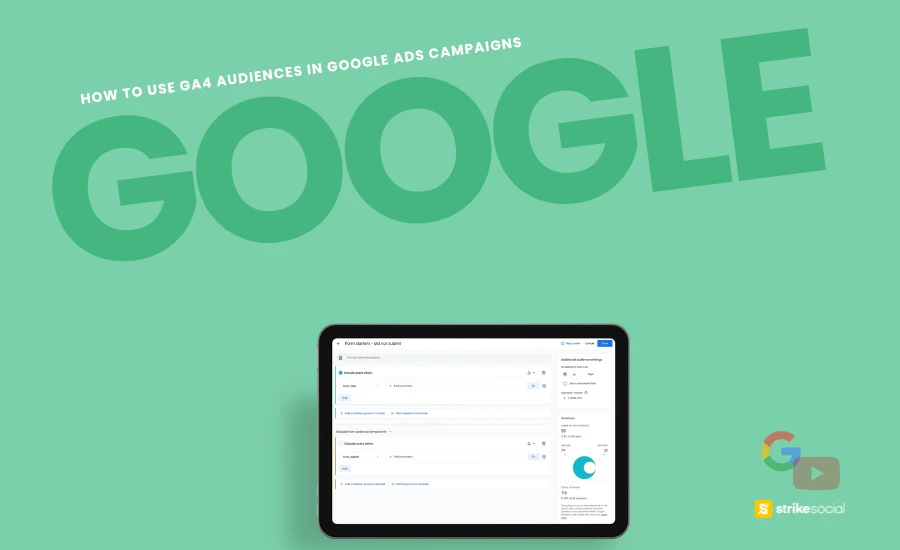
Connecting Google Analytics 4 with Google Ads gives advertisers access to richer audience insights. These segments, built from behavioral and predictive data, enable more targeted campaigns, better budget allocation, and stronger conversion outcomes.
Enhanced Brand Exclusions and Campaign-Level Negative Keywords
Historically, advertisers have found that Performance Max campaigns sometimes divert budget by bidding on branded terms, taking traffic away from dedicated branded campaigns. To address this, Google has introduced brand exclusion lists.
These lists allow you to prevent your PMax ads from bidding on specific branded terms so the campaign adheres to its intended keyword strategy.
- For retail advertisers using product feeds, you can apply these brand exclusions to your Search ads, keeping branded traffic directed to your Shopping ads.
- Furthermore, campaign-level negative keywords are now available to all advertisers. This feature gives you the ability to exclude specific, unsuitable search queries, improving overall brand safety and relevance.
URL Contains Rules, Placement and Demographic Exclusions
Daily account management now benefits from more granular targeting controls within Performance Max (PMax) campaigns:
- URL Contains: PMax campaigns that utilize product feeds can now employ “URL contains” rules. This allows for targeting traffic based on specific e-commerce page categories (e.g., pages with “new-release” in the URL) or product types (e.g., pages containing “haircare”).
- Placement Exclusions: You can now exclude specific display placements and search partner sites from PMax at the account level. This is a significant improvement, addressing a previous hurdle in running Performance Max, where the campaign type automatically utilized all channels.
- Age and Gender Exclusions: Demographic exclusions can now be applied at the campaign level. This gives more control, especially if a brand would prefer targeting Gen Z audiences and excluding older age groups. Alternatively, if the target audience is the working class and older demographic, younger age groups can be excluded.
Upgraded Creative Controls for Google and YouTube Ads
Google is emphasizing the importance of high-quality creative assets in your PMax campaigns. Substandard creatives are no longer sufficient, which is why new tools are being introduced to help you test and optimize assets specifically for YouTube and Display advertising.
Expanded Video Limits and Asset Group Optimization
Google has expanded the video asset limit within each Asset Group for Performance Max campaigns, raising it from five to 15. This update simplifies video asset management by reducing fragmentation and allows for the use of various ratios and formats without the need to set up multiple Asset Groups.

Performance Max A/B Asset Testing Introduced
A highly anticipated feature, particularly by conversion rate optimization specialists, has finally arrived: a new Beta allows advertisers to A/B test different asset sets within a Performance Max campaign.
You can compare variations while keeping common assets consistent across both versions. This delivers vital asset-level insights to tell you what is actually driving results, without hurting the campaign’s overall automation.
When setting up a test within a PMax campaign test, the assets in your asset group are divided into three categories for comparison:
| Component | Description | Traffic Split |
|---|---|---|
| Control Group (Assets A) | A selection of your existing assets is used as the baseline for comparison. | These assets serve to their respective traffic split alongside the Common assets. |
| Treatment Group (Assets B) | A selection of assets (which can be other existing assets or new uploads) that are being tested against the Control group. | |
| Common Assets | Any assets in the asset group that are not selected for either the Control or Treatment group. | These assets continue to serve normally to 100% of your campaign’s traffic, alongside both the Control and Treatment assets. |
Best Practices for PMax Campaigns: How to Optimize After the Updates
Now that you have the latest Performance Max news and updates, optimizing your campaigns comes down to precise, daily management. Here are the fresh best practices for your PMax campaigns:
- Force Top-of-Funnel Prospecting: Apply first-party audience exclusions to allow Google’s AI to find net-new customers. Combine this with the High Value New Customer mode to ensure the AI prioritizes high-value audience profiles.
- Deploy Campaign-Level Negative Keywords: Exclude specific queries for ad suitability at the campaign level, rather than relying solely on account-level lists. This can help you narrow down target keywords you can show up for for specific campaigns, such as seasonal ones for spring or Thanksgiving.
- Run Methodical Asset Tests: Resolve creative limitations using data-driven A/B testing. Test substantial differences in your Treatment Group, such as comparing lifestyle imagery with YouTube Shorts ads, while maintaining your Common Assets to ensure a stable baseline for comparison.
- Maintain Weekly Placement Audits: Make it a habit to check the “Where ads showed” report on a weekly basis. If you detect low-value impressions spiking on the Google Search Partners network, deploy the new account-level placement exclusions immediately to protect your performance.
Google Is Changing PMax Campaigns, For the Better
The days of operating PMax campaigns based on blind trust are over. Google’s 2026 updates have fundamentally transformed the platform, making it a highly steerable, data-rich engine. These new granular controls level the playing field, making Performance Max far more competitive by offering every advertiser the advantage of fair and transparent bidding opportunities.
Are your current campaigns already utilizing these new features, or are you still relying on obsolete automation tactics? Contact Strike Social today to partner with our experts and convert these latest updates into guaranteed outcomes.

Article by
Lee Baler, Strike Social’s VP of Sales & Strategy
Lee leads global strategy, helping clients and agencies maximize YouTube and paid social performance. Constantly tracking industry trends, he translates insights into strategies that help brands stay competitive and achieve sustained profitability.


